Discord emoji size: the file limit, the pixel size and how to fit a GIF
A Discord emoji must be at most 256 KiB (262,144 bytes), and Discord's documentation names 128 × 128 pixels as the emoji image size. The limit is a file size, not a pixel size, so a 128 px GIF can still be refused when it has too many frames or colours. According to Discord's developer documentation, animated emoji have the same limit. Below are measured sizes, what to cut first, and how many slots a server gets.
By Kevin Fan ·
What Discord says: size limit, pixels and formats
According to Discord's developer documentation, emoji and animated emoji have a maximum file size of 256 KiB, which is 262,144 bytes. The same page lists the formats you can upload as JPEG, PNG, GIF, WebP, AVIF, and its create endpoints refer to the 128x128 emoji image.
Discord's help article on custom emoji says you can upload an emoji up to 128 × 128 pixels, and that a name needs at least 2 characters, using only letters, numbers and underscores. We read it in a real browser on 7 Nov 2026. Discord can change these rules, so check its pages before you upload.
Discord's own beginner's guide to custom emojis, dated 12 December 2025, gives the same 256 KB figure, says other sizes work but 128 × 128 is the one it recommends, and says Discord will compress an emoji that is a bit too big. We did not upload anything to Discord, so we cannot say where that compression stops working.
Upload size versus display size
People who search for the Discord emoji size often mean two different things. The upload size is the picture you give Discord, and the help article puts it at up to 128 × 128 pixels. The display size is how big the emoji looks in chat, and the same article, which we read on 7 Nov 2026, says emoji are shown resized to 32 × 32 pixels.
That is why a sharp 128 px emoji still looks small in a message. The Discord pages we read do not describe a setting for the chat size. The LoopGIF maker previews your emoji at 32 px on a light and a dark background, so you see roughly what chat will show before you upload.
How many emoji slots a server gets
Discord's beginner's guide to custom emojis quotes the slots as 50 regular and 50 animated emoji on a standard server, 150 of each at boost Level 2 and 250 of each at Level 3. Animated emoji have their own slots, so a full set of regular emoji does not use them up.
The same guide says you need Nitro to use newly uploaded animated emoji. A server with no free slot can refuse an upload even when the file is fine, so count the slots before you start shrinking a GIF.
Why Discord says an emoji is too big: bytes, not pixels
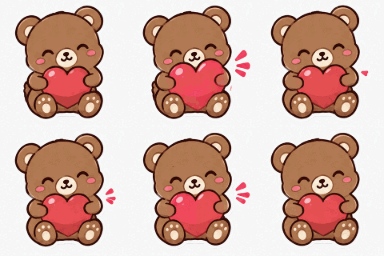
The limit is a file size, so pixels do not decide whether a file passes. A 128 × 128 GIF of our 16-frame bear sticker is 70,780 bytes, while a clip of 80 frames at the same pixel size and colours is 535,801 bytes. Pixels matter only because fewer of them make a smaller file.
Read the exact byte count, not the rounded size a file manager shows. Some file managers count a KB as 1,000 bytes, so a file listed as 260 KB can still be under 262,144 bytes, while one listed as 263 KB is over it. A file named .gif may also be another format inside, which the Check a file tab of the maker reads from the header.
Measured: GIF size by pixels, colours and frames
We made these files with the encoder of the LoopGIF Discord emoji maker, from two of our own animations: a 16-frame, 1.6-second bear sticker, and an 80-frame, 8-second clip with a transparent background. Each cell is the exact byte count and whether it is under 262,144 bytes. The last column keeps every 2nd frame.
| Size and colours | All 16 frames | Every 2nd frame (8 frames) |
|---|---|---|
| 128 px, 255 colours | 70,780 bytes, fits | 37,818 bytes, fits |
| 128 px, 128 colours | 49,174 bytes, fits | 27,396 bytes, fits |
| 128 px, 64 colours | 33,546 bytes, fits | 20,331 bytes, fits |
| 96 px, 255 colours | 43,874 bytes, fits | 24,264 bytes, fits |
| 96 px, 128 colours | 31,370 bytes, fits | 17,981 bytes, fits |
| 96 px, 64 colours | 20,376 bytes, fits | 12,715 bytes, fits |
| 64 px, 255 colours | 21,032 bytes, fits | 11,735 bytes, fits |
| 64 px, 128 colours | 14,693 bytes, fits | 9,059 bytes, fits |
| 64 px, 64 colours | 10,070 bytes, fits | 6,395 bytes, fits |
| Size and colours | All 80 frames | Every 2nd frame (40 frames) |
|---|---|---|
| 128 px, 255 colours | 535,801 bytes, over | 271,281 bytes, over |
| 128 px, 128 colours | 467,736 bytes, over | 238,881 bytes, fits |
| 128 px, 64 colours | 394,927 bytes, over | 202,477 bytes, fits |
| 96 px, 255 colours | 345,161 bytes, over | 174,166 bytes, fits |
| 96 px, 128 colours | 309,711 bytes, over | 155,621 bytes, fits |
| 96 px, 64 colours | 263,792 bytes, over | 133,067 bytes, fits |
| 64 px, 255 colours | 179,011 bytes, fits | 91,556 bytes, fits |
| 64 px, 128 colours | 162,741 bytes, fits | 82,846 bytes, fits |
| 64 px, 64 colours | 141,957 bytes, fits | 72,742 bytes, fits |
On the bear, starting from 128 px, 255 colours and all 16 frames (70,780 bytes), dropping to 64 colours made the file 2.11 times smaller, shrinking the picture to 64 px made it 3.37 times smaller, and keeping every 2nd frame made it 1.87 times smaller. Every bear file fits. The ratios belong to this clip; another clip can rank the levers differently.
The long clip shows the other half. At 128 px, none of the three colour settings fits with all 80 frames, and the smallest is 394,927 bytes. At 96 px and 64 colours it misses by only 1,648 bytes. It fits at 64 px (179,011 bytes), and at 128 px with 64 colours when every 2nd frame is dropped (202,477 bytes).
 128 px
 96 px
 64 px
 255 colours
 64 colours
 64 px, all frames
 128 px, every 2nd frame
What to cut first when a GIF is over 256 KiB
Start with the length. If a clip has dozens of frames, trim it or keep every 2nd frame before you touch anything else, because frames multiply everything else. In our long clip, keeping every 2nd frame took the 128 px, 64-colour file from 394,927 bytes to 202,477 bytes.
Then lower the colours. On the bear this took the 128 px file from 70,780 bytes to 33,546 bytes, but fewer colours show as bands in smooth gradients, so compare the result with the original. Shrink the picture last. An emoji is shown at 32 px in chat, so a smaller upload loses less than it seems to on this page.
The GIF compressor can do the searching: choose a target size such as 256 KB and it keeps trying until the file fits. For an exact square, the GIF resizer has a 128 × 128 preset, and Cut GIF trims a clip to fewer frames.
Transparent edges, and a light or dark chat
According to the GIF89a specification, a frame can name one colour index as transparent, so a pixel is either clear or opaque, with no partly transparent edge. Soft edges from a cutout are blended toward a matte colour, and a white matte can leave a pale fringe on a dark background.
We wrote one of our dance stickers at 320 px with a white matte (311,232 bytes) and a dark matte (311,232 bytes). The byte counts are equal, though the two files are not identical. Both are shown below on a dark background. Pick the matte that matches where the emoji will sit, and check the maker's preview on both backgrounds. The transparent GIF maker has the same matte control.
 White matte
 Dark matte
Make a Discord-size emoji with LoopGIF
- Open the Discord emoji maker and drop a GIF, a short video or a picture on the Upload tab. The file is opened on your device and is not uploaded.
- Drag the square box over the part you want to keep, or type its position and size.
- Choose Animated GIF, pick the size (128 is the one Discord recommends; 96 and 64 are smaller options), and type an emoji name.
- Press Make emoji. The checklist shows the byte count against the 262,144-byte limit, the dimensions and the frames. If the file is too big, the maker shows how many frames a smaller size would keep.
- Already have a file? The Check a file tab reads its real format, exact byte count, size and frame count, and changes nothing.
- Download the file and upload it in Discord.
How we checked this page
We read Discord's developer documentation and its beginner's guide to custom emojis on 18 Nov 2026, and Discord's help article on 7 Nov 2026. Every byte count above was measured with LoopGIF's own encoder on our own animations. We have not uploaded these files to Discord, so we do not claim that Discord accepted them. See all LoopGIF guides for related help.
Questions, answered
What is the Discord emoji size limit?
Emoji and animated emoji can be at most 256 KiB, which is 262,144 bytes, according to Discord's developer documentation. The limit is the same for a still and an animated emoji. The documentation names 128 × 128 pixels as the emoji image size and lists JPEG, PNG, GIF, WebP, AVIF as upload formats.
What pixel size should a Discord emoji be?
Discord's beginner's guide recommends 128 × 128 pixels and says other sizes work. The help article, which we read on 7 Nov 2026, says you can upload up to 128 × 128. The LoopGIF maker offers 128, 96 and 64 pixel squares. The smaller two are our own options for long animations, not Discord rules.
How big can an animated Discord emoji be?
The same 256 KiB limit applies, and it counts the whole file, not one frame. An emoji with more frames, more colours or a bigger picture is a bigger file. Our 8-second clip was 535,801 bytes at 128 px, and needed 64 px, or half its frames, to get under the limit.
Why does Discord say my emoji is too big?
Most likely the file is over 262,144 bytes. Pixels do not matter to that check, only bytes do. Read the exact byte count, then cut frames first, colours next and pixels last. If the file is already under the limit, check that it really is a GIF, and that the server has a free slot.
How do I make a GIF smaller for Discord?
Trim the clip or keep every 2nd frame, lower the colours, then shrink the picture. On our bear, 64 colours made the file 2.11 times smaller and half the frames 1.87 times smaller. The GIF compressor takes a target size such as 256 KB and keeps trying until the file fits.
Can I make Discord emoji bigger in chat?
Discord's help article, which we read on 7 Nov 2026, says emoji are shown resized to 32 × 32 pixels in chat. The pages we read do not describe a setting that changes this, so uploading more pixels does not by itself make an emoji look bigger. Check Discord's current help article, because it may have changed.