GIF frame rate checker
Find out how fast a GIF really plays. Drop a file and see its frame count, the delay of every frame, the mean, slowest and fastest frame rate, the duration, the loop count, the size and the palette. It warns about delays under 2 cs. It runs in your browser: no upload, no sign-up.
Free · no sign-up · runs in your browser
GIF only · up to 25 MB · up to 300 frames · nothing is uploaded
How to use it
Drop your GIF
Drop a GIF onto the box or click to choose one. Up to 25 MB. The file is read on your device and never leaves it, and no pixels are decoded.
Read the facts
The cards show the frame count, mean rate, slowest and fastest rate, duration, loop setting, dimensions, file size and transparency.
Look at the delays
The chart shows the delay of each frame, and the table lists each frame's stored delay, the delay it plays at, its palette and its disposal method. A red row has a delay under 2 cs.
Fix what you find
Use Change the speed to open the GIF in the speed changer, or Change the loop count to open it in the loop changer. The file is passed on in your browser.
Examples made with this tool
Each example is a report on one of our own GIFs. The GIF is on the left and the report the tool shows is on the right, and the settings line lists the main numbers.
 Original
 Report
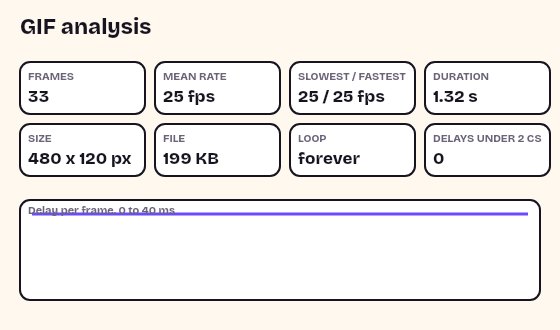
A steady 25 frames per second: every frame has the same 4 cs delay, so the slowest and fastest frame rates are the same. The loop block says forever.Settings used33 frames, mean 25 fps, slowest frame 25 fps, fastest 25 fps, loop forever, 0 delays under 2 cs.GIF 199 KB (480 × 120 px) → an analysis of the file, read without decoding any pixels  Original
 Report
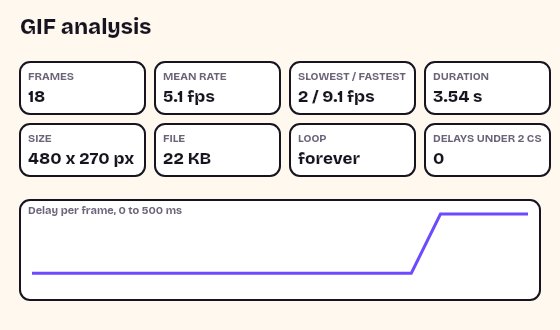
A typing GIF is uneven on purpose. Letters appear a frame at a time and the finished text holds, so the mean is about 5 frames per second but the range is from about 2 to 9.Settings used18 frames, mean 5.1 fps, slowest frame 2 fps, fastest 9.1 fps, loop forever, 0 delays under 2 cs.GIF 22 KB (480 × 270 px) → an analysis of the file, read without decoding any pixels  Original
 Report
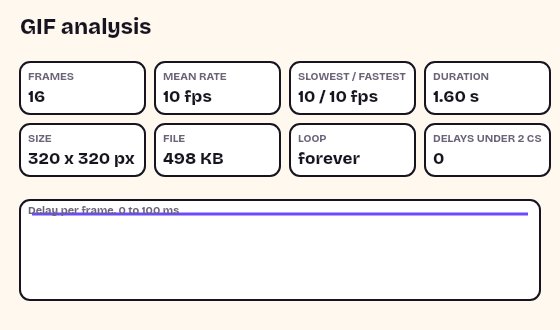
Sixteen frames of 10 cs each: 10 frames per second for 1.6 seconds. With one fixed rate, all three rate cards show the same number.Settings used16 frames, mean 10 fps, slowest frame 10 fps, fastest 10 fps, loop forever, 0 delays under 2 cs.GIF 498 KB (320 × 320 px) → an analysis of the file, read without decoding any pixels 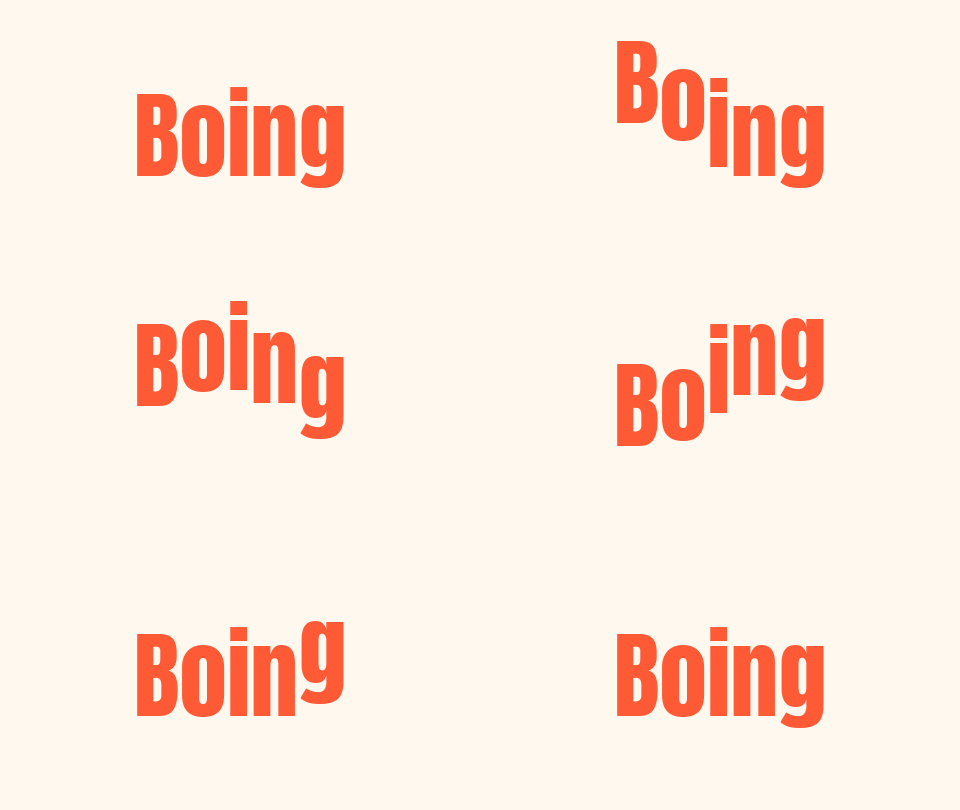 Original
 Report
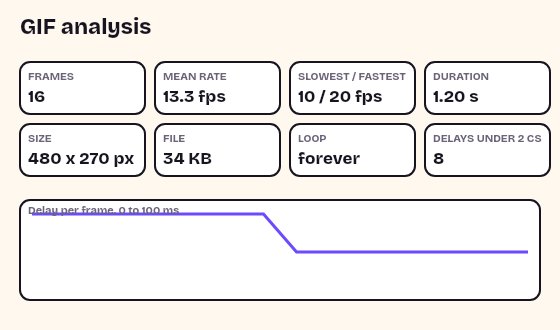
We made this copy by setting the delay of the first 8 frames to 1 cs. The checker counts those 8 frames as 10 cs, shows the warning, and reports the speed the file plays at, not the speed it stores.Settings used16 frames, mean 13.3 fps, slowest frame 10 fps, fastest 20 fps, loop forever, 8 delays under 2 cs.GIF 34 KB (480 × 270 px) → an analysis of the file, read without decoding any pixels
What each number means
The mean frame rate is the number of frames divided by the total playing time. The slowest rate belongs to the frame that is shown the longest, and the fastest to the frame that is shown the shortest. A GIF with a fixed delay has one rate for all three numbers. A GIF with a long hold on the last frame has a low slowest rate and a mean that sits between the two ends.
The stored delay is the number in the file, in hundredths of a second (cs). The played delay is the one the tool uses for the rate. The two differ only for frames that store 0 or 1 cs, which the tool counts as 10 cs. The duration is the sum of the played delays.
Delays under 2 cs
A GIF stores each delay in hundredths of a second. Many files, especially ones made years ago for very fast animation, store 0 or 1. Some players slow those frames down to 10 cs, which is a tenth of a second, so a GIF that claims to run at 100 frames per second can play at 10 or slower. Other browsers and apps may treat these delays differently.
The checker uses the same rule as the rest of this site, counting them as 10 cs, and marks each such frame in red, so you can see how many frames are affected. If many frames are marked, the file will play slower than its stored numbers suggest, and the speed changer can set a fixed delay of 20 ms or more that plays the same everywhere.
Loop count, palette and disposal
The loop count is read from the loop block of the file. Forever means the block stores 0. A number means the animation plays that many more times after the first. No loop block means the GIF plays once. Some apps and sites ignore the loop setting, so the number describes the file and not what every player will do.
The palette size is the number of colours in the colour table each frame uses, shown as the table's size, not the number of colours actually drawn. A GIF can have one global table or a table of its own for each frame. Disposal says what happens to the area of a frame before the next one is drawn: nothing specified, keep it, clear it to the background, or restore what was there before. The tool reports them as stored.
Related tools
Once you know the numbers, these tools change them.
- GIF speed changer: change the speed, or set one fixed delay for every frame.
- GIF loop changer: set the loop to forever, once or a number of plays.
- GIF player: step through the frames one at a time and see each delay.
When the numbers help
Checking a slow GIF
See whether the file really has few frames or long delays.
Finding a fast GIF
Spot delays under 2 cs that make a GIF play slower than expected.
Comparing versions
Check the frame rate and size before and after you edit.
Preparing for a limit
Read the dimensions, the size and the duration before you upload.
Debugging a loop
See whether a GIF stores a loop count at all.
How this tool works and its limits
This is what the checker reads, and where it stops.
- Your GIF never leaves your device. The file is read in your browser, with no upload and no account. Pixels are not decoded, so there is no frame limit; only the 25 MB file size limit applies.
- The tool reads the structure of the file. It does not judge the picture, and it does not check how an app or site will play it.
- The mean frame rate is based on the delays the rule this site uses: a stored delay of 0 or 1 cs counts as 10 cs. Other apps may differ.
- Palette size is the size of the colour table, not the number of colours actually used in the picture.
- The table shows 60 frames first and loads more on request, so a long GIF stays fast to read.
- A file with a damaged block can be refused. The page then says that the file ends in the middle of a block or has an unknown block.
- We built and tested this tool in current desktop Chrome. It uses ordinary canvas, workers and GIF decoding, and the list below checks your own browser live. We have not tested other browsers ourselves.
Questions, answered
How do I find the frame rate of a GIF?
Drop the GIF. The Mean rate card shows the number of frames divided by the playing time, and the Slowest to fastest card shows the range if the delays differ.
Why does the checker say a delay is under 2 cs?
The file stores a delay of 0 or 1 hundredth of a second for that frame. The checker counts such frames as 10 cs, the rule this site uses for every GIF, and marks them.
What does the loop count mean?
Forever means the file asks players to repeat without end. A number means that many more plays after the first. None means the GIF plays once. Some apps ignore this setting.
Can it check a very long GIF?
Yes. The tool does not decode the pictures, so there is no frame limit. The file size limit is 25 MB.
Can I change the frame rate here?
Not here. Use Change the speed to open the GIF in the speed changer, where you can scale the speed or set one fixed delay.
Is my GIF uploaded?
No. The file is read on your device. Nothing is sent to a server and you need no account.
Related tools
Other tools you may need next.
 GIF Speed ChangerFreeSpeed up or slow down any GIF and keep its timing.
 GIF LooperFreeSee and change a GIF's loop count: forever, once or N times, without re-encoding.
 GIF PlayerFreePlay, pause and step a GIF frame by frame, then save the frame you see as a PNG or a still GIF.
 Add Text to GIFFreeCaption a GIF or short MP4 with several text layers and per-layer frame ranges.