Gradient Text Generator
Fill your text with a gradient that moves. Choose two, three or four colours, set the angle, decide how many colour cycles pass in each loop and download an animated gradient text GIF. It runs in your browser, so there is no sign-up and no watermark, and your text stays on your device.
Free · no sign-up · runs in your browser
estimating size
Encoding happens in your browser when you click Download. Nothing is uploaded.
How to use it
Pick a gradient
Sunset, Ocean, Aurora or Candy in Style presets. Each one sets a word, a font, two to four colours, an angle and a background. You can change all of them.
Type your text and choose a font
Thick letters show more of the gradient. Anton, Fredoka, Lobster and Pacifico work well. One to three words suit a gradient best.
Set the colours, angle and speed
Choose 2, 3 or 4 under Colour stops, then change each colour. Set the Angle from 0 to 345 degrees in steps of 15, and set Speed to 1, 2 or 3 cycles per loop.
Download your gradient GIF
Press Download GIF. The 24-frame loop is encoded in your browser and saved straight away. Tick Transparent background first if you want to place the word on another picture.
Examples made with this tool
Four gradient text GIFs made by this tool. Each caption lists the exact settings, and the size line under each GIF is measured from the real file.
 seamless
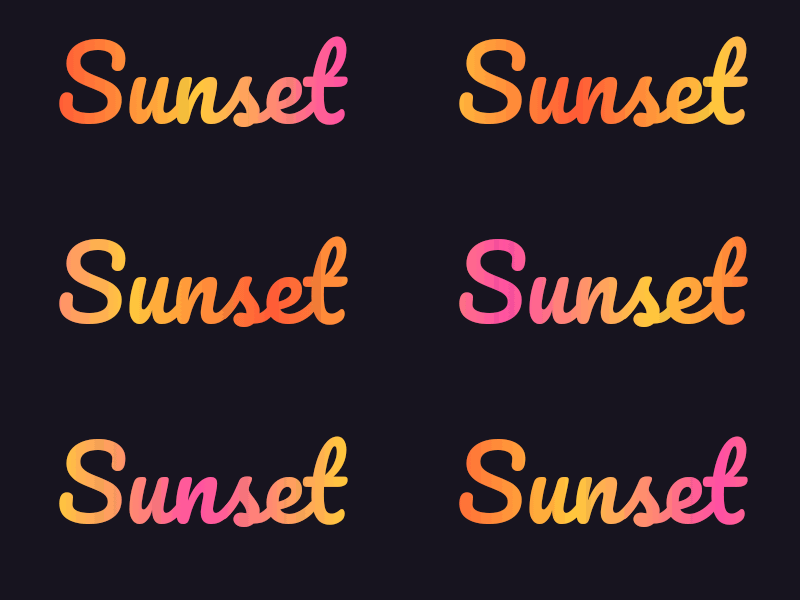
Sunset preset: three stops (#ff5a36, #ffc83d, #ff4fa3), angle 0, Pacifico at 100 px.Settings usedPacifico, 100 px · 400 × 200 · #17141f on #17141f · gradient #ff5a36 to #ffc83d to #ff4fa3, angle 0°, 1 cycle(s) per loop24 frames · 116 KB · 1.2 s loop 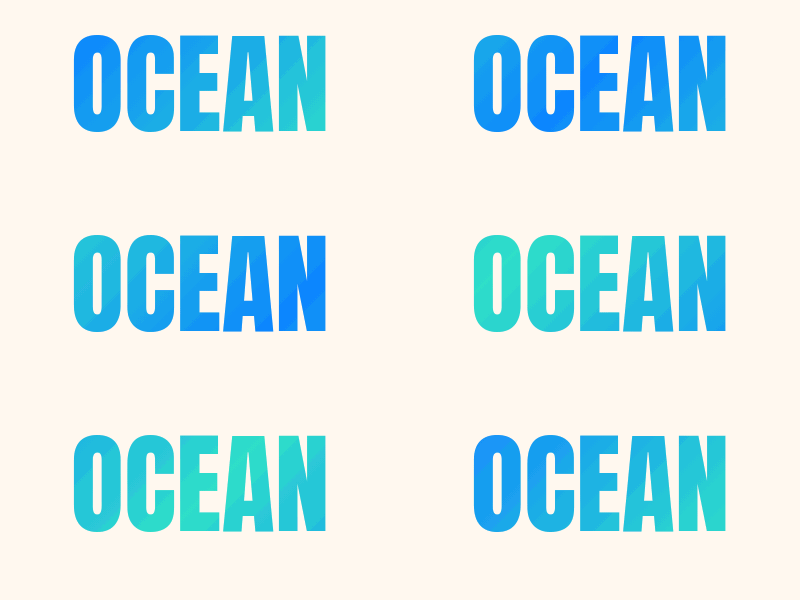 seamless
Ocean preset: two stops, angle 45, Anton at 110 px.Settings usedAnton, 110 px · 400 × 200 · #17141f on #fff8ef · gradient #0b84ff to #2fe0c8, angle 45°, 1 cycle(s) per loop24 frames · 116 KB · 1.2 s loop 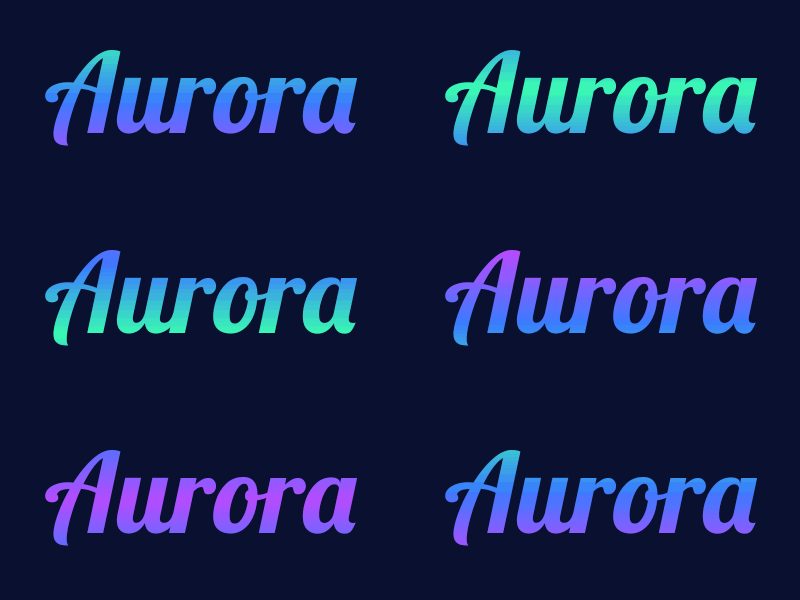 seamless
Aurora preset: three stops, angle 90 so the colours run vertically, Lobster at 110 px.Settings usedLobster, 110 px · 400 × 200 · #17141f on #0a1030 · gradient #39ffb0 to #3a7bff to #b44cff, angle 90°, 1 cycle(s) per loop24 frames · 101 KB · 1.2 s loop 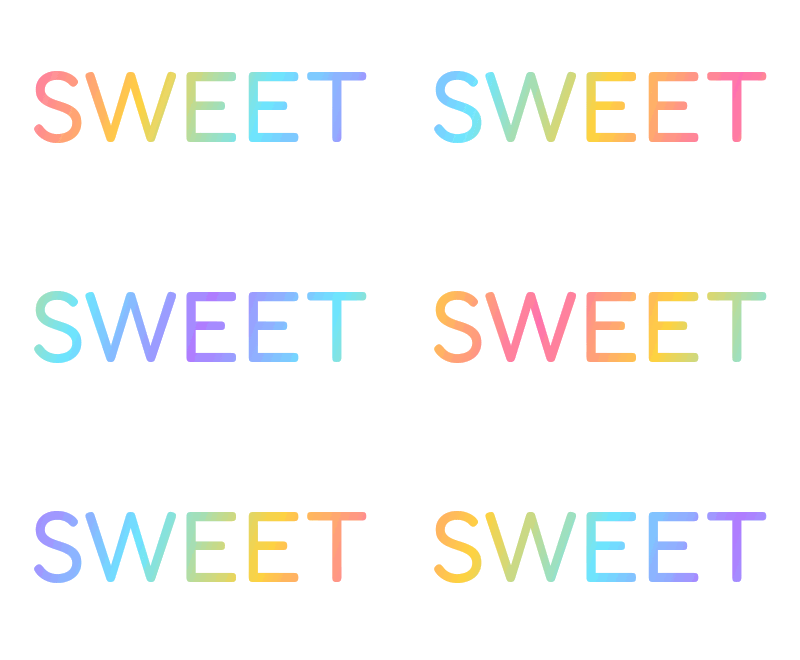 seamless
Candy preset: four stops, angle 20 and Speed 2, so two colour cycles pass in each loop.Settings usedFredoka, 100 px · 400 × 220 · #17141f on #ffffff · gradient #ff6fb1 to #ffd23f to #6ce6ff to #b07bff, angle 20°, 2 cycle(s) per loop24 frames · 108 KB · 1.2 s loop
How the moving gradient works
The gradient is a repeating pattern that is twice as long as your text along the angle you chose, so the letters always show a full run from the first colour to the last. Each frame slides the pattern along that angle and the letters show whatever part of it is behind them. After the number of cycles you set, the last frame leads exactly into the first, so the loop does not jump.
With three colours a, b and c, the pattern runs a, b, c, b and back to a. With two colours it runs a, b and back to a. That mirroring is what keeps the colours smooth where one cycle ends and the next begins. Without it, the last colour would cut straight to the first.
Angle and speed
Angle 0 runs the colours from left to right, 90 from top to bottom, and 45 diagonally. The length of one cycle is twice the length of your text along that angle, so a tall, narrow word at angle 90 and a wide word at angle 0 each show the whole colour run at any moment.
Speed counts whole colour cycles per loop. At 1, the gradient moves slowly, which suits calm lettering. At 2 or 3 it moves faster and the colours flow more energetically. The loop is always 24 frames at 5 hundredths of a second, which is 1.2 seconds, so a higher speed means a larger step per frame, not a longer file.
Choosing colours that work
Neighbouring colours blend smoothly, so a gradient between close hues, such as orange to pink, looks rich. Opposite colours pass through a muddy middle, because the blend is a straight mix in RGB. If you want a cleaner transition, add a third colour between them.
GIF can hold at most 256 colours, so the encoder rounds the smooth blend to a palette. At the sizes on this page, between 101 KB and 117 KB, it looks smooth. A transparent GIF has on-off transparency, so soft edges are blended toward the Edge colour you choose.
More ways to animate text
Gradient is one of several effects built on the same free text engine.
- Text GIF maker with six effects: typing, slide, bounce, neon, wave and glitter on one page, with an AI tab.
- Rainbow text generator: a smooth moving rainbow, or a solid colour that cycles.
- Add text to an existing GIF: caption a GIF or video you already have.
What people use gradient text for
Headlines and headers
A word with a slow gradient makes a banner or a page header feel alive without much movement.
Brand and logo explorations
Try a name with your brand colours and see how a gradient looks on it before you commit.
Social posts and covers
A short title with a moving gradient stands out in a feed. Keep the canvas small so the file stays light.
Overlays and stickers
Export with a transparent background and place the word over a photo or video in an editor that supports transparent GIFs.
Presentations
An animated gradient heading adds polish to a slide. Add an outline if the slide background is busy.
How this tool works and its limits
What this gradient text generator does with your text, and where it stops.
- Everything happens in your browser. Your text is not uploaded, no account is needed and no watermark is added.
- Text is limited to 200 characters. The canvas can be up to 640 pixels wide and 640 pixels tall, within 307,200 pixels in total.
- The loop is 24 frames at 5 hundredths of a second, which is 1.2 seconds. Every GIF is capped at 150 frames, and the estimate under the preview is usually within a quarter of the real size.
- You can use 2 to 4 colour stops. The angle moves in steps of 15 degrees from 0 to 345, and speed is 1, 2 or 3 colour cycles per loop.
- GIF has at most 256 colours, so the smooth gradient is rounded to a palette. Large canvases may show faint colour steps.
- Transparent GIFs have on-off transparency only. Soft edges blend toward the Edge colour you pick. Multi-line text shares one gradient across the whole text block.
- We tested this page in Chrome. It needs a 2D canvas and a Web Worker. If your browser cannot encode the GIF, the page shows an error and nothing is uploaded.
Questions, answered
How do I make gradient text?
Type your text, pick a gradient style, change the colours and angle, and press Download GIF. The preview shows the exact animation that will be saved.
Is the gradient text generator free?
Yes. It is free, needs no sign-up and adds no watermark. Your text stays on your device. The only paid option is the AI version, which costs 1 credit.
How many colours can a gradient have?
Two, three or four. The colours repeat in a mirrored order so the loop is smooth, for example a, b, c and back through b to a.
Can I make the gradient run in a different direction?
Yes. Use the Angle slider from 0 to 345 degrees. Zero runs left to right and 90 runs top to bottom. The gradient always moves along that angle.
Can I get gradient text with a transparent background?
Yes. Tick Transparent background and choose an Edge colour that matches the page where you will use the GIF. Soft edges are blended toward that colour.
Can AI make a fancier gradient version?
Yes. The button under the preview opens the AI tab of Text to GIF with your text and the sticker pop style filled in. It draws lettering with decoration around it, costs 1 credit and needs a signed-in account.
Related tools
Other tools you may need next.
 Text to GIFFree + AIDescribe a GIF, or animate exact words with AI.
 Rainbow Text GeneratorFreeA smooth moving rainbow across your letters, or a solid colour that cycles through the hues.
 Add Text to GIFFreeCaption a GIF or short MP4 with several text layers and per-layer frame ranges.
 AI Sticker Generator1 creditDescribe a sticker and get an animated GIF, with transparent GIF and PNG export.