Sliding Text GIF Maker
Make a scrolling text GIF or a marquee banner. Type your message, pick a direction and speed, and download a loop that wraps with no jump. Free, in your browser, no sign-up.
Free · no sign-up · runs in your browser
estimating size
Encoding happens in your browser when you click Download. Nothing is uploaded.
How to use it
Type your message
Enter up to 200 characters. For left and right scrolling the message runs on one line; for up and down it wraps to the canvas width.
Choose a banner size
Tap a canvas size such as 728 by 90 or 468 by 60, or set a custom size. Then try a preset: LED sign, Scroll sign, Ad banner or News ticker.
Set direction and speed
Pick left, right, up or down, set the scroll speed in pixels per second and the space between repeats. The preview loops exactly as the GIF will.
Download the GIF
Read the frame count and estimated size under the preview, then press Download GIF. Encoding runs in your browser when you click.
Examples made with this tool
Every GIF below is a real export from this tool, with its settings listed.
 seamless
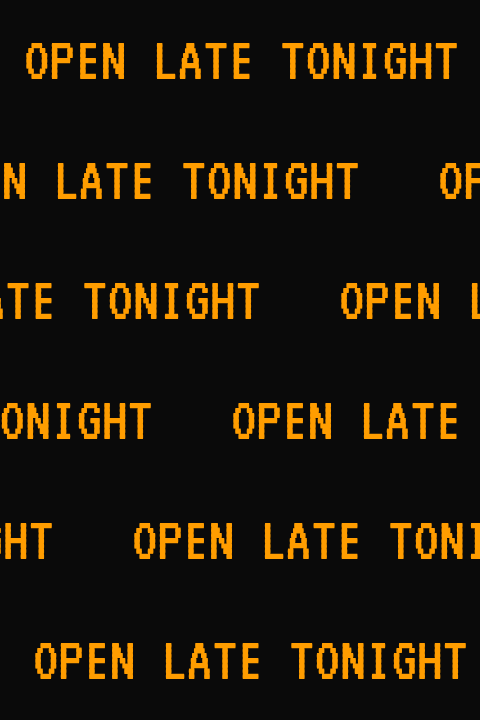
LED sign preset: VT323 at 64 px in amber on black, set to scroll left at 220 pixels per second.Settings usedVT323, 64 px · 480 × 120 · #ff9d00 on #0a0a0a · scroll left at 220 px per second · 70 px gap57 frames · 215 KB · 2.3 s loop  seamless
Ad banner preset at 468 by 60: Bebas Neue on lime, scrolling left with a 60 pixel gap between repeats.Settings usedBebas Neue, 44 px · 468 × 60 · #17141f on #c8f031 · scroll left at 260 px per second · 60 px gap39 frames · 167 KB · 1.6 s loop  seamless
Scroll sign preset: white Oswald on red with a text shadow, a short message that repeats often.Settings usedOswald, 48 px · 360 × 90 · #ffffff on #c4281c · scroll left at 240 px per second · 60 px gap · text shadow30 frames · 114 KB · 1.2 s loop 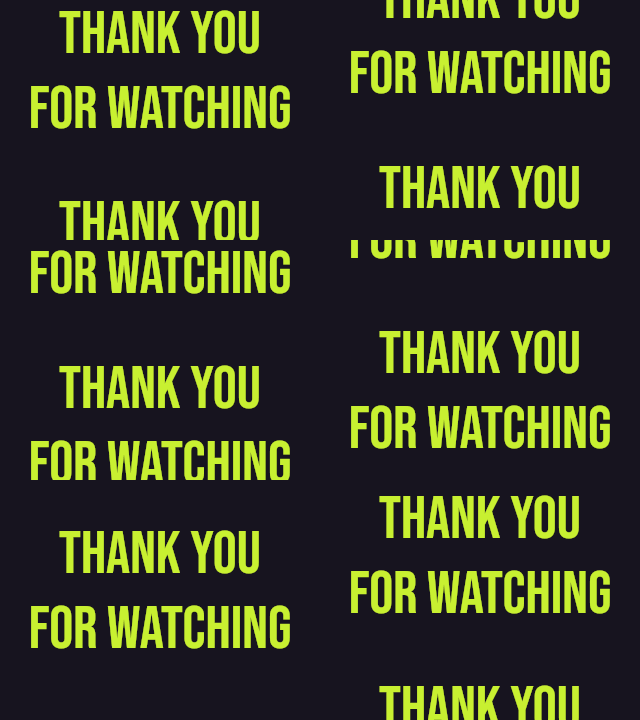 seamless
Direction Up: a two-line closing message rolling like end credits, wrapped to the canvas width.Settings usedBebas Neue, 60 px · 320 × 240 · #c8f031 on #17141f · scroll up at 120 px per second · 40 px gap38 frames · 215 KB · 1.5 s loop
What people make with it
Scrolling text GIF banners
A scrolling line of text works as a header strip for a page, a forum signature or a newsletter, with no video player needed.
Marquee text GIFs
The old marquee look is a message sliding across a strip and wrapping around. This tool makes it as a GIF that loops cleanly.
Stream and community banners
Use the 4:1 and 3:1 header sizes for channel or server banners. They are plain pixel sizes, so check the size your platform asks for.
LED and shop-sign looks
Pixel fonts such as VT323 and Press Start 2P on a black strip look like a dot-matrix sign for an opening-hours or sale message.
Credits and rolling lists
Scroll up or down to roll a thank-you message or a short list, with a gap you control between repeats.
How this tool works and its limits
These are the real limits, so there are no surprises when you export.
- Everything runs in your browser. Your text is drawn on a canvas and encoded in a worker on your device. Nothing is uploaded, no account is needed and no watermark is added.
- The loop is seamless because the distance it travels is an exact multiple of the pixels moved per frame. To make that true, the gap between repeats can grow by a few pixels. The first frame and the frame after the last are identical.
- A GIF is capped at 150 frames. A long message at a slow speed would need more, so the tool moves more pixels per frame instead. Very slow, very long scrolls therefore look a little steppier.
- Delays are whole hundredths of a second and never shorter than two. The tool tells you the real speed after rounding when it differs from the one you set.
- Text is limited to 200 characters. Canvases can be up to 728 pixels wide and 640 tall, with at most 307,200 pixels in all. Scrolling changes every frame, so wide banners and long loops make big files; the estimate under the preview shows it.
- Thirteen bundled fonts load on demand from this site, all under the SIL Open Font License. Emoji use your device's emoji font. With Transparent background, soft edges blend toward the edge colour you choose, because GIF transparency is on or off.
- Works in current Chrome, Edge, Firefox and Safari. The size shown is an estimate; the file is measured after you download it.
Questions, answered
How do I make a scrolling text GIF?
Type your message above, choose Left, Right, Up or Down, set the speed and canvas size, and press Download GIF. The preview loops exactly like the file, so you can adjust until it looks right.
What is a marquee text GIF?
A marquee is text that slides across a strip and wraps around to the start. This tool makes that as a GIF. The loop is seamless, so the end of the message meets the beginning with no jump.
What size should a banner GIF be?
That depends on where you will post it, so check the size your platform asks for. The tool offers 728 by 90, 468 by 60, 640 by 160, 600 by 200 and a square, or any custom size up to 728 by 640.
Is the sliding text GIF maker free, and do I need to sign up?
It is free, needs no sign-up and adds no watermark. Everything is drawn and encoded on your device, so nothing is uploaded. An AI-styled version is a separate tool that costs one credit.
Why is my scrolling GIF file so large?
Every frame changes while text scrolls, so the file grows with the canvas area and the number of frames. Use a smaller canvas, a shorter message or a faster speed to cut the size. The estimate under the preview updates as you change settings.
Can the scrolling text GIF have a transparent background?
Yes. Tick Transparent background and set the edge colour to the colour of the page it will sit on. GIF has no partial transparency, so the edge colour keeps the soft edges of the letters tidy.
Related tools
Other tools you may need next.
 Typing Text GIF MakerFreeTypewriter-style text GIFs with cursor, fonts and transparent background.
 GIF Speed ChangerFreeSpeed up, slow down or reverse any GIF and keep its timing.
 Text to GIFFree + AIDescribe a GIF, or animate exact words with AI.
 Image to GIFFreeCombine several images into one GIF: reorder, set delays, crossfade.